1.
Please confirm if you load the latest firmware in your router. You can review the process of firmware version checking and upgrading process below:
(1)
Firmware version checking: How to check firmware version for your router?
(2)
Firmware upgrade process: How to upgrade firmware for your router?
2.
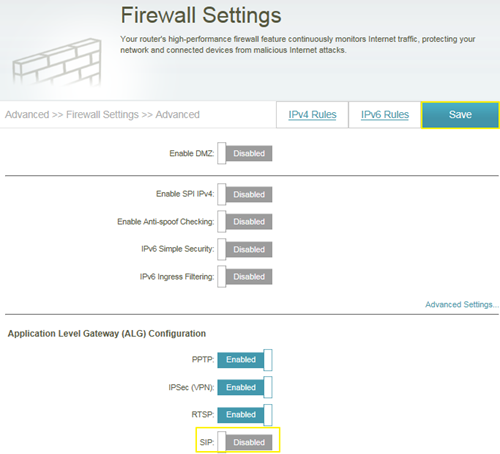
Disable the SIP ALG feature on your router
SIP ALG allows devices and applications using VoIP (Voice over IP) to communicate across NAT. Some VoIP applications and devices have the ability to discover NAT devices and work around them. This ALG may interfere with the operation of such devices. If you are having trouble making VoIP calls, try turning this ALG off.
Please launch your browser and enter
http://dlinkrouter.local or
http://192.168.0.1 into the address bar. Then login and follow the steps below:
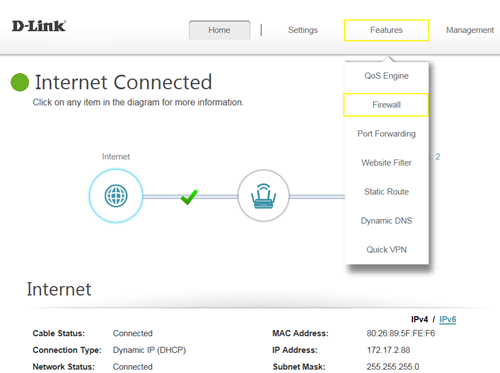
Step 1: First, click
Feature ->
Firewall:
 Step 2:
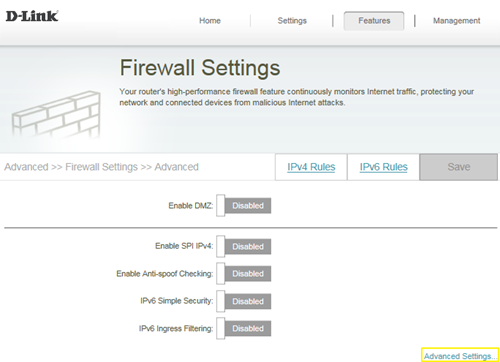
 Then, click
Advanced Settings:
 Step 3:
 Click
SIP to disable SIP ALG, then click
Save: