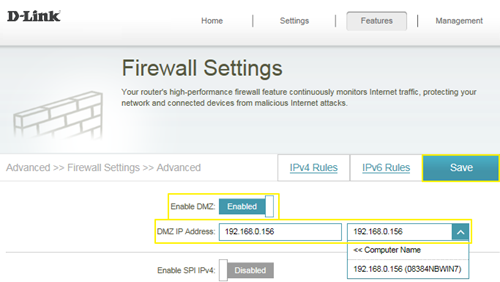
DMZ should only be used if you have a computer/device that cannot run Internet applications properly from behind the router.
Note: By enabling the DMZ (Demilitarized Zone) feature, you are allowing the router to forward all incoming traffic from the internet to the device specified, virtually disabling the routers "firewall protection". This may expose the device to a variety of security risks, so only use this option as a last resort.
Please launch your browser and enter
http://dlinkrouter.local or
http://192.168.0.1 into the address bar. Then login and follow the steps below:
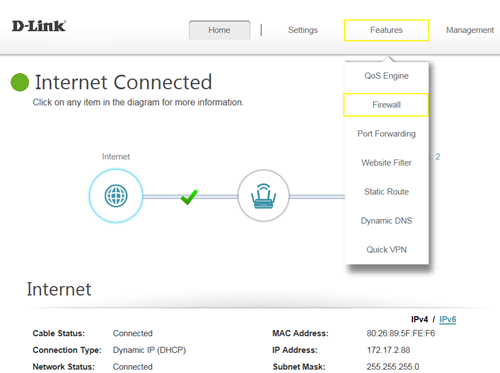
Step 1: Click
Features ->
Firewall
 Step 2:
 Click
Enable DMZ to toggle the DMZ state, and fill in the IP address of the specified device (One device only), then click Save.